- People analytics software collects and analyzes workforce data from multiple systems to answer questions an HRIS alone cannot, such as who is at flight risk and why, not just who is currently employed.
- The term is often used interchangeably with 'HR analytics,' though some vendors draw a distinction: people analytics increasingly pulls in finance, operations, and business data, not HR data alone.
- Platforms fall into a few real categories: embedded HRIS reporting, dedicated enterprise platforms, engagement and culture-focused tools, and a newer cross-system category that connects HR to payroll, finance, and operations.
- Company size and data maturity change the right answer. Under roughly 100 to 200 employees, HRIS reporting is often enough; past that, a dedicated platform starts to earn its cost.
- Below: what the software should do, the real benefits, a quick list of tools to know, the real categories to choose between, a practical selection framework, and where a cross-system platform like Hobasa fits.
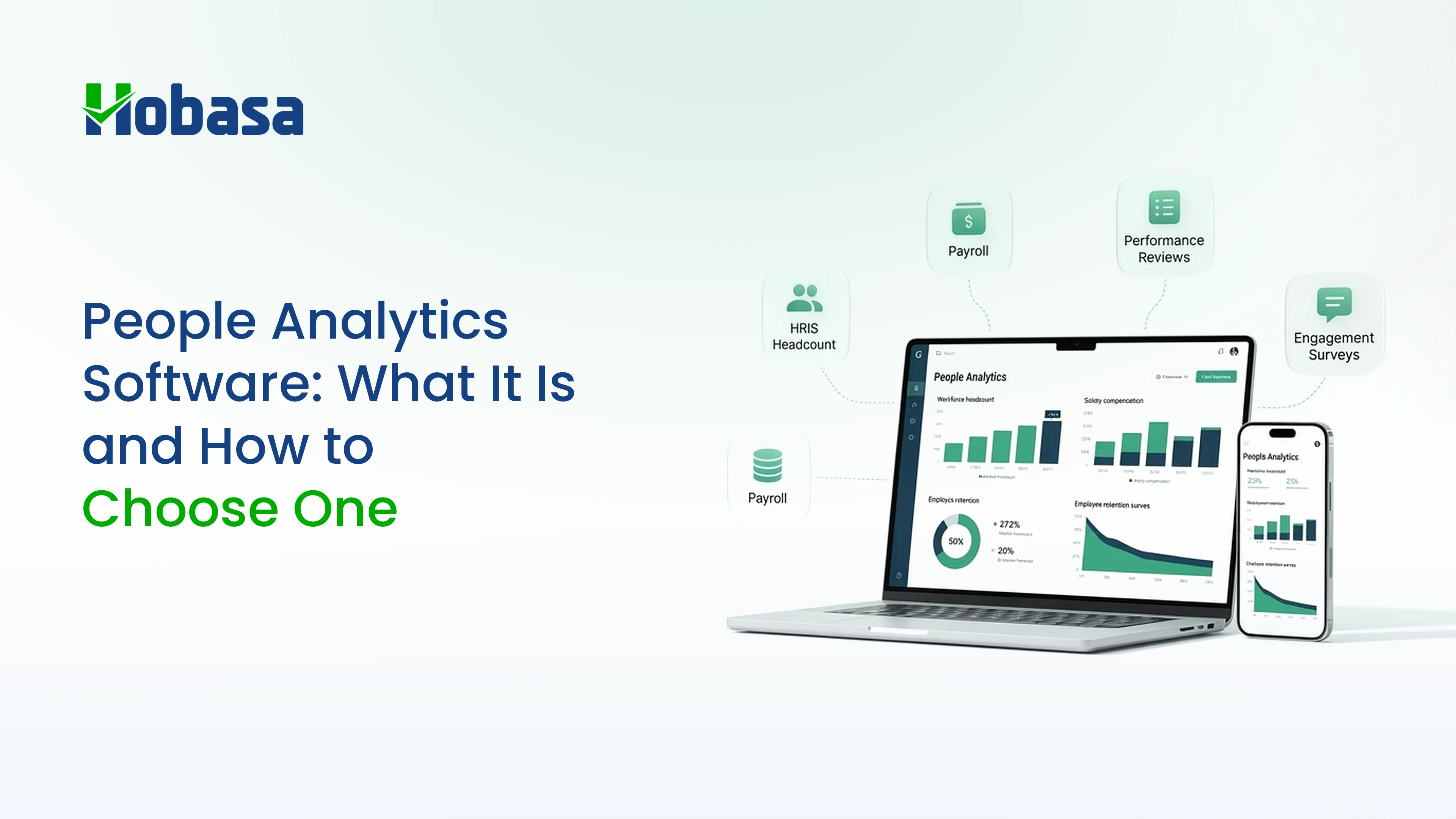
Workforce data is spread across more systems than most leaders realize. Headcount sits in the HRIS, compensation in payroll, performance in review platforms, and engagement in survey tools. People analytics software brings those signals together to help leaders understand what is actually happening across the workforce. The challenge is choosing a platform that delivers useful answers, not simply another collection of dashboards.
What Is People Analytics Software?
People analytics software collects workforce data from HR systems, payroll, recruiting tools, performance reviews, and engagement surveys, then analyzes it to explain patterns and predict outcomes, rather than just storing records. Where an HRIS answers "how many people do we have and what do we owe them," people analytics software answers "which teams are about to lose people, and why."
The core mechanic underneath almost every serious platform is data aggregation: pulling scattered systems into one consistent model so a metric means the same thing everywhere it appears. Without that, "headcount" can mean three different numbers depending on which system someone opens, which defeats the purpose before the analysis even starts.
People Analytics vs. HR Analytics vs. Workforce Analytics vs. HRIS
These terms get used loosely, and the loose usage causes real confusion when comparing vendors.
| Term | What it actually means | Typical examples |
|---|---|---|
| HRIS | A system of record for employee data and core HR administration | BambooHR, Rippling |
| HR analytics | Analyzing HR-department data (turnover, time-to-fill, performance) for HR decisions | Reporting modules inside an HRIS or HCM |
| People analytics | Used interchangeably with HR analytics by most vendors; some extend it beyond HR data into finance and operations | Visier, Illoominus |
| Workforce analytics | Often emphasizes labor cost, scheduling, and operational workforce data | Workforce management-adjacent platforms |
In practice, most vendors treat "people analytics" and "HR analytics" as the same product category, and the label on a homepage tells you less than the actual data sources the platform connects to. If you want a deeper, vendor-by-vendor comparison for the CFO and CHRO buying committee specifically, see Best HR Analytics Software for CFOs & CHROs in 2026.
Shopping for people analytics that goes beyond HRIS reports?
Hobasa connects people and cost data so CHROs and CFOs work from the same numbers.
Talk to our teamWhat People Analytics Software Should Do
Strip away the marketing language and a genuinely useful platform needs to cover a consistent set of jobs:
Data aggregation: pulling HRIS, payroll, recruiting, and engagement data into one consistent model, so a metric is not defined in three different ways.
Reporting and dashboards: standard workforce metrics available on demand, not rebuilt by hand every month.
Predictive analytics: forecasting attrition, hiring needs, and workforce cost before they show up as a problem, not just after.
Self-service for managers: letting a manager look at their own team's data without waiting on an HR analyst for every question.
Benchmarking: comparing your numbers against relevant peers, not just against your own history.
Security and access control: sensitive employee data needs governed access, not a shared spreadsheet.
Auditability: any number a leader takes into a board meeting should trace back to a source record, not just a chart.
AI-assisted insight, with a human still checking it: using AI to summarize patterns and flag anomalies faster than manual review, while a person confirms the finding before it reaches a decision-maker.
Two things are conspicuously absent from that list on purpose: it does not say "prettiest dashboard," and it does not say "most features." Reviewers evaluating dozens of these platforms consistently note that the differentiator is whether a tool connects insight to a recommended next step, not whether it displays more charts. A platform that tells you turnover rose 4% without saying which team, since when, or what changed is a chart, not an answer.
Benefits of People Analytics Software
Done well, the payoff shows up in a handful of concrete ways, not just "better data":
Faster, more confident decisions. Leaders act on a current number instead of waiting for a manual pull, or guessing.
Earlier retention signals. Flight risk shows up in patterns weeks or months before someone hands in notice, giving managers time to actually act.
Less time spent rebuilding reports. Standard metrics that used to take a day in spreadsheets are available on demand.
More accurate cost and headcount figures. One number for a board or budget conversation, instead of three competing versions from three different systems.
Better hiring outcomes. Connecting recruiting data to downstream performance and retention shows which channels and criteria actually produce good hires, not just fast ones.
Lower compliance risk. Gaps and anomalies surface on a rolling basis instead of at an audit, when it is already too late to fix quietly.
A shared source of truth. HR, Finance, and leadership arguing about whose number is right wastes more time than the analysis itself; agreement on the number is often the actual win.
Top People Analytics Tools to Know
A quick reference before you start evaluating, grouped by the category each tool actually fits, not by marketing language:
Visier: deep predictive modeling and benchmarking, built for large enterprises with a dedicated data team.
One Model: heavy customization and machine learning models for attrition and quality of hire, enterprise-focused.
Workday (People Analytics / Prism Analytics): best if you already run Workday HCM and want analytics inside the same data model.
HiBob: analytics embedded inside a modern HRIS, a common fit for mid-market companies.
Culture Amp: survey-first, deep engagement and culture benchmarking.
Workhuman: recognition-driven people analytics with an AI assistant for natural-language queries.
ChartHop: visual, org-design-centric headcount and scenario planning.
Illoominus: a cross-system decision layer connecting HR, payroll, finance, and operations.
Hobasa: a cross-system intelligence layer connecting HR, payroll, finance, recruiting, and operations, with source-grounded, human-reviewed findings.
For a full head-to-head comparison of the CFO- and CHRO-relevant platforms in this list, including strengths and limitations for each, see Best HR Analytics Software for CFOs & CHROs in 2026.
Comparing people analytics tools in 2026?
See where Hobasa fits when you need cross-system clarity, not another siloed dashboard.
Get in touchThe Different Types of People Analytics Software
"People analytics software" is not one category. It is at least four, and picking the wrong one is the single most common buying mistake, because the four categories solve genuinely different problems even though they get marketed with nearly identical language.
Embedded HRIS reporting
Many HRIS and HCM platforms now ship with a built-in analytics layer. Workday and HiBob are common examples. This is often genuinely sufficient if your main need is standard reporting and you are not trying to combine data from systems outside that platform. The tradeoff is scope: it sees what that one platform sees, and nothing else.
Dedicated enterprise platforms
Visier and One Model are the reference points here: deep predictive modeling, heavy benchmarking, and the ability to unify data across many HRIS and operational systems. These are built for large organizations with a data team to run them, and typically carry enterprise pricing and a multi-month implementation.
Engagement and culture-focused platforms
Culture Amp and Workhuman lead this category. These are survey-first: strong on sentiment, recognition, and engagement-driven retention signals, but not built to bring in payroll or finance data natively. They answer "how do people feel," not "do the numbers agree."
Cross-system intelligence platforms
A newer category, occupied by vendors including Illoominus and Hobasa, built specifically to connect HR data with payroll, finance, recruiting, and operations at once, rather than analyzing HR data in isolation. The pitch here is not a prettier HR dashboard; it is that workforce decisions increasingly depend on data that lives outside HR entirely, and that somebody has to reconcile it.
General-purpose AI tools
There is also a fifth, informal category worth naming honestly: general-purpose AI chat tools used for ad hoc workforce analysis. They are flexible and require no implementation, but they carry no data governance, no audit trail, and no guarantee the underlying numbers are correct, which matters a great deal for anything that reaches a board or a compliance file.
How Company Size and Data Maturity Change the Answer
The right category depends heavily on where your organization actually sits, not where you'd like to be in two years.
Under roughly 50 employees: HRIS reporting or a spreadsheet is usually genuinely sufficient. Dedicated software is overhead you do not yet need.
Roughly 100 to 200 employees: this is the threshold most buyer's guides point to as where dedicated analytics starts paying for itself, once questions get more complex than a single system can answer.
Mid-market: platforms in this range commonly take 6 to 12 weeks to implement, covering data integration, dashboard configuration, and training.
Large enterprise: platforms like Visier or Workday People Analytics often run 3 to 6 months to implement, reflecting the complexity of connecting many systems at scale.
None of this is a reason to over-buy early. A 40-person company evaluating an enterprise platform built for 5,000 employees is solving a problem it does not have yet.
How to Choose People Analytics Software: A Practical Framework
Skip the feature-list comparison and start with your actual question.
Name the specific decision you are trying to make. Not "we want better data," but "we need to know which managers are losing people and why." A vague goal produces a vague shortlist.
List every system that holds part of the answer. HRIS, payroll, recruiting, engagement, and, increasingly, finance. If the answer spans more than one of these, cross-system platforms deserve a look, not just HR-only tools.
Decide whether you need structured data, behavioral data, or both. Headcount and compensation are structured. Sentiment and engagement are behavioral. Some platforms specialize in one; fewer do both well.
Check integration depth against your real stack, not a generic "integrates with HRIS" claim. Ask for the specific systems, not the category.
Ask how findings get reviewed. Predictive output that reaches a decision-maker without a human checking it is a liability, not a feature, in HR and compliance-sensitive contexts.
Match implementation timeline to your urgency. A 6-month enterprise rollout is the wrong choice if the board wants an answer next quarter.
Price the realistic total cost, including the internal time to run it, not just the license fee.
Not sure which category fits your systems? Talk to the Hobasa team and walk through what your HRIS, payroll, and finance data each say about the same workforce question today.
Make the shortlist with cost and workforce in one view.
Hobasa helps leadership choose and run people analytics against the systems you already trust.
Talk to our teamWhy Choose Hobasa
Most people's analytics platforms, including strong ones, are built to analyze HR data more deeply. Hobasa is built to solve a slightly different problem: what happens when HR, payroll, finance, and operations each hold a piece of the answer, and none of them agree.
A scenario worth recognizing. The HRIS shows headcount at 142. Payroll's latest run reflects 138. Finance's cost model, built off last quarter's budget, assumes a different number again. Nobody is lying. Each system is accurately reporting what it was told, at a different moment, using a slightly different definition. A people analytics platform built inside just one of these systems will confidently show that system's number and never mention the other two disagree, because it has no visibility into them.
Hobasa is a cross-system intelligence layer, not an HRIS, payroll system, or accounting system. It connects to the systems a company already runs, HRIS, payroll, recruiting, finance, and operations, and reads across all of them at once, rather than replacing any of them.
What that looks like in practice:
It connects HR, payroll, finance, recruiting, and operations in one place, not HR data alone.
It surfaces disagreement between systems as the finding itself, instead of silently picking one number and moving on.
Every finding is source-grounded, citing the specific record it came from, a payroll line, an HRIS field, a recruiting record, rather than a conclusion with no trail back to the data.
A person reviews every finding before it reaches a CFO, CHRO, or board, following Hobasa's stated AI-assisted, human-reviewed approach.
It works alongside your existing systems. No migration, no rip-and-replace. Your HRIS, payroll, and recruiting tools stay exactly as they are.
This is the clearest way to know if Hobasa is the right category for you: if your main need is deeper analysis of data that already lives in one HR system, a dedicated HR or people analytics platform is likely the better fit. If your main problem is that HR, payroll, and finance each answer the same workforce question differently, and nobody has connected them to find out why, that is the specific gap Hobasa is built for.
See how a cross-system platform actually works. Explore the Hobasa platform to see how findings get built from more than one system at once, cited, and reviewed before they reach you.
Common Mistakes to Avoid
Buying for the feature list instead of the actual question. A long feature list does not fix a vague goal.
Ignoring integration depth. "Integrates with HRIS" can mean a shallow one-way export. Ask which specific systems, and how live the connection actually is.
Skipping the human-review question. A platform that produces confident predictions with no review step is a bigger risk than no analytics at all in a compliance-sensitive context.
Over-buying for your current size. An enterprise platform bought two years too early is a cost center, not an advantage.
Assuming HR-only data is enough. If the real question involves payroll or finance figures disagreeing with HR's, an HR-only platform will confidently answer with HR's number and never mention the disagreement exists.
Treating the label on the homepage as the category. "People analytics" and "HR analytics" are marketing terms as much as functional ones. Judge a platform by which systems it actually connects to, not by which word it uses to describe itself.
Final Takeaway
Buying people analytics software starts with naming the actual question you are trying to answer, not the platform you have heard the most about. Some organizations need deeper analysis of data that already lives in one system. Others need agreement between systems that were never built to talk to each other. Knowing which one you are solving for is most of the decision.
Talk to the Hobasa team about which category fits your systems. Book a walkthrough and bring one real workforce question your current systems answer differently.
Find the right people analytics approach for your systems.
Bring your HR, payroll, finance, recruiting, and operations data together and see where your workforce systems agree or disagree.
FAQs
People analytics software collects workforce data from HR systems, payroll, recruiting, and engagement tools, then analyzes it to explain patterns and predict outcomes, such as attrition risk or workforce cost trends, rather than just storing employee records the way an HRIS does.
Most vendors use the terms interchangeably. Where a distinction is drawn, "people analytics" is sometimes used for platforms that extend beyond HR data into finance, operations, and other business data, while "HR analytics" more narrowly refers to HR-department metrics.
No. An HRIS is the system of record for employee data and core administration. People analytics software analyzes data, often pulled from the HRIS and other systems, to answer questions the HRIS was never built to answer. Most organizations need both.
Cost varies widely by category. Embedded HRIS reporting is often included in your existing platform. Mid-market dedicated tools and enterprise platforms carry separate licensing, and the real cost also includes implementation time and the internal staff needed to run it.
Most buyer's guides point to roughly 100 to 200 employees as the threshold where dedicated software starts paying for itself. Below that, HRIS reporting or a well-organized spreadsheet is usually enough.
Some can. Most HR-only and engagement-focused platforms do not natively pull in payroll or finance data. A smaller, newer category of cross-system platforms, including Hobasa, is built specifically to connect HR, payroll, finance, and operations data together.
Start with the specific decision you need to make, not a feature list. If the answer lives entirely inside your HR data, a dedicated HR or engagement-focused platform likely fits. If the answer depends on HR, payroll, and finance data agreeing with each other, a cross-system platform is the better starting point.